An AI assistant that answers your customers and takes orders for you
On the phone and in your website chat — 24/7. It checks products and stock, takes orders, tracks parcels and books appointments in 19 languages.
+359 2 428 5030 · Call a real HelpVox assistant. Ask about a product, place a test order or switch to another language.
An illustrative call. With you, the assistant answers from your own catalogue, calendar and rules — on the phone and in your website chat.
- Works 24/7
- Phone and chat
- 19 languages
- Handover to a person
- API and integrations
- Transcripts and AI analysis
It doesn't just talk. It gets things done.
HelpVox uses your products, prices, stock and business rules to give a specific answer and carry out the next step.
Hover or tap a card to see an example.
One platform, three doors into your business
The same catalogue, the same orders, the same rules — reached three different ways.
Phone and website chat
Your customers talk to your assistant
Someone calls or opens the chat on your site. The assistant answers from your live catalogue, checks stock and takes the order.
For your customers
Agentic commerce
Other people's AI agents find your products
An external AI agent reads your published catalogue and searches it. Where it supports the flow, it hands the customer over to your assistant to finish.
For AI agents shopping on a customer's behalf
Read moreAI management
You run the business by asking
Connect Claude or Codex and do the daily work in plain words: show the orders that need attention, change the assistant's instructions, sync the catalogue.
For you and your team
Read more
Who HelpVox is for
Online shops
The main scenario: the assistant sells, tracks and supports, the way a good operator would.
- Product questions
- Stock and prices
- Taking orders
- Parcel tracking
- Changes, cancellations and returns
Businesses with bookings
Salons, practices, workshops — anything that runs on appointments.
- Free slots
- Booking and rescheduling
- Confirmations
- Reminders
- Collecting the information you need up front
Every conversation, order and next step — in one place
The dashboard shows what the customer said, what the assistant understood and what it did — for every call and chat.
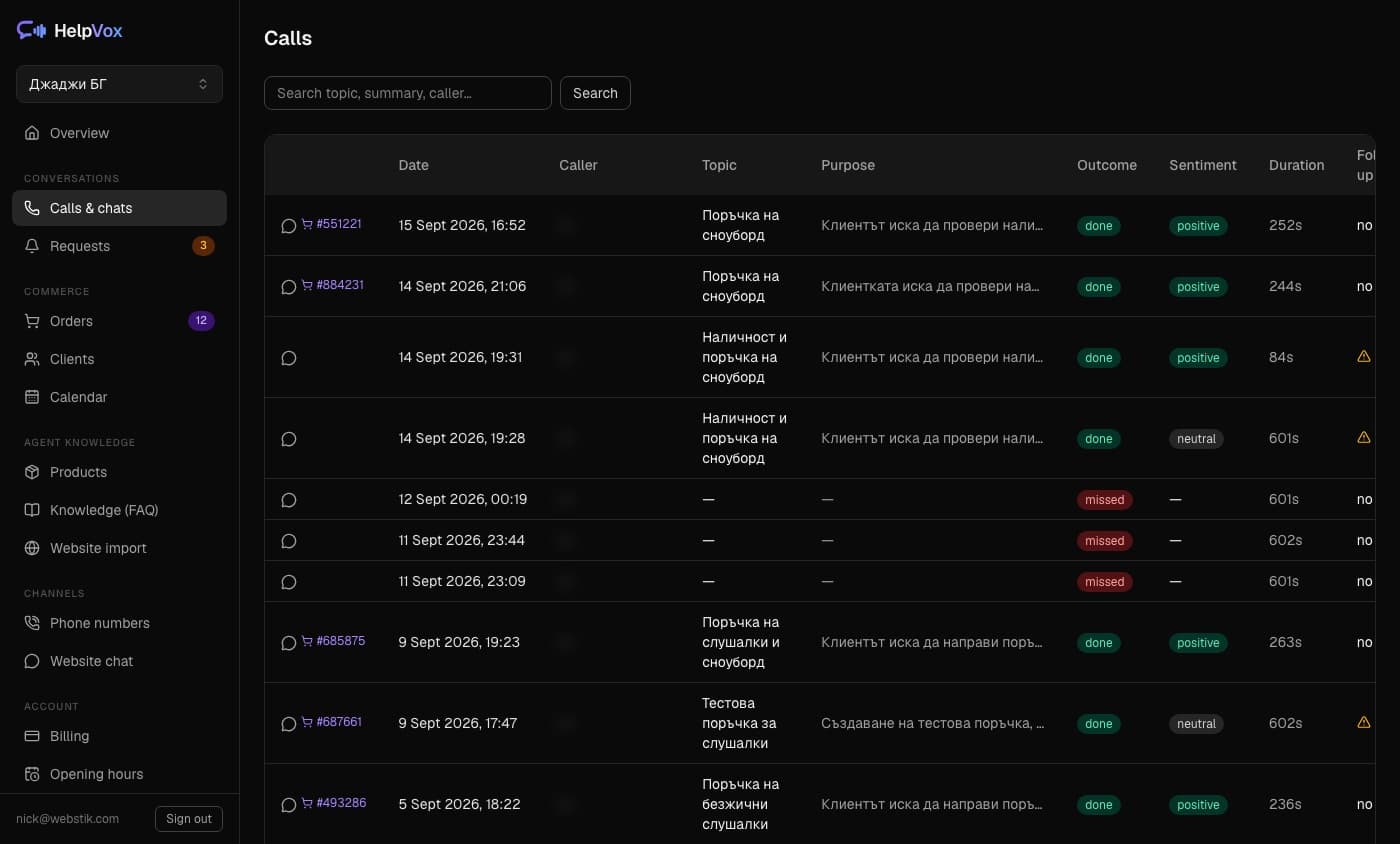
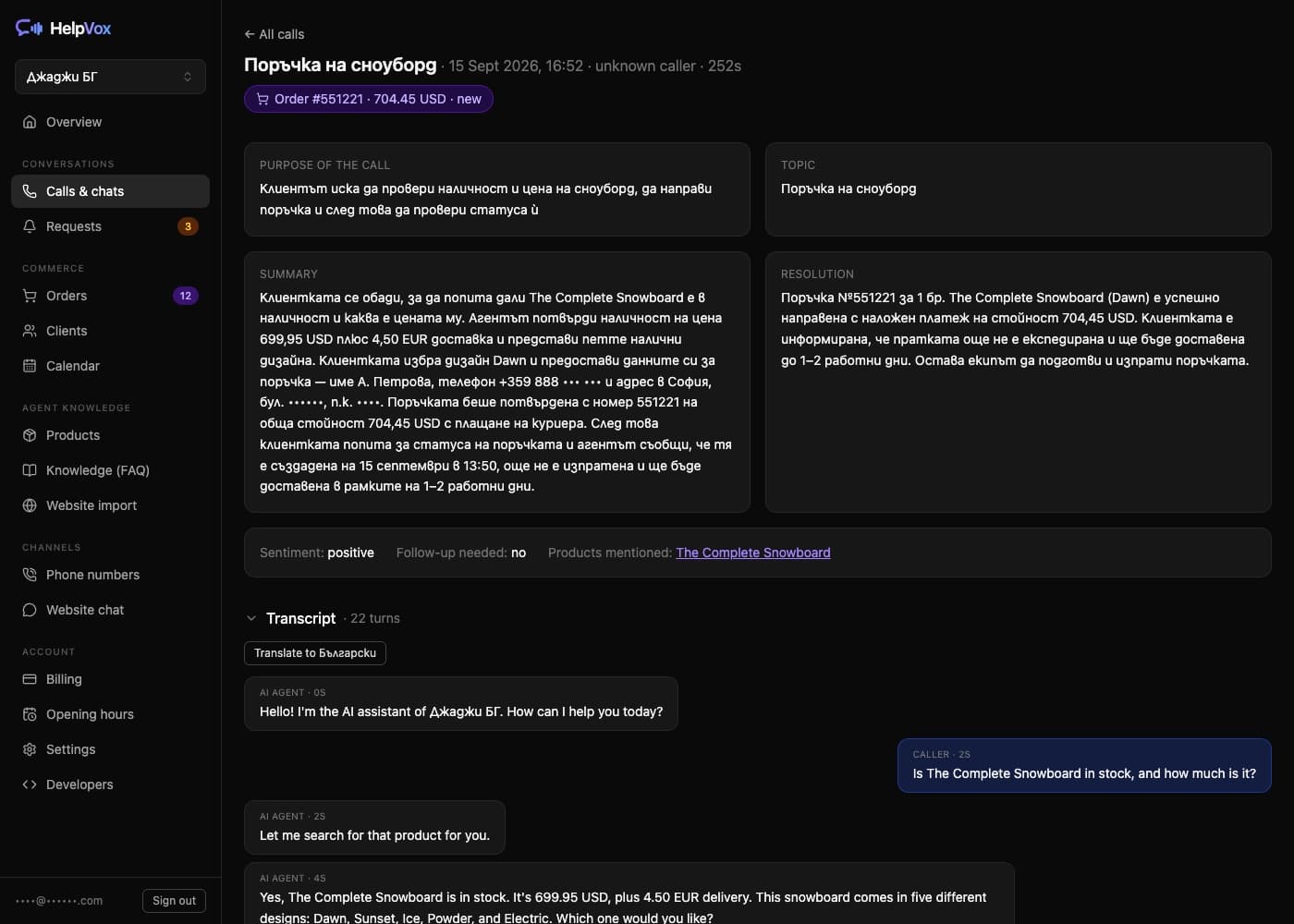
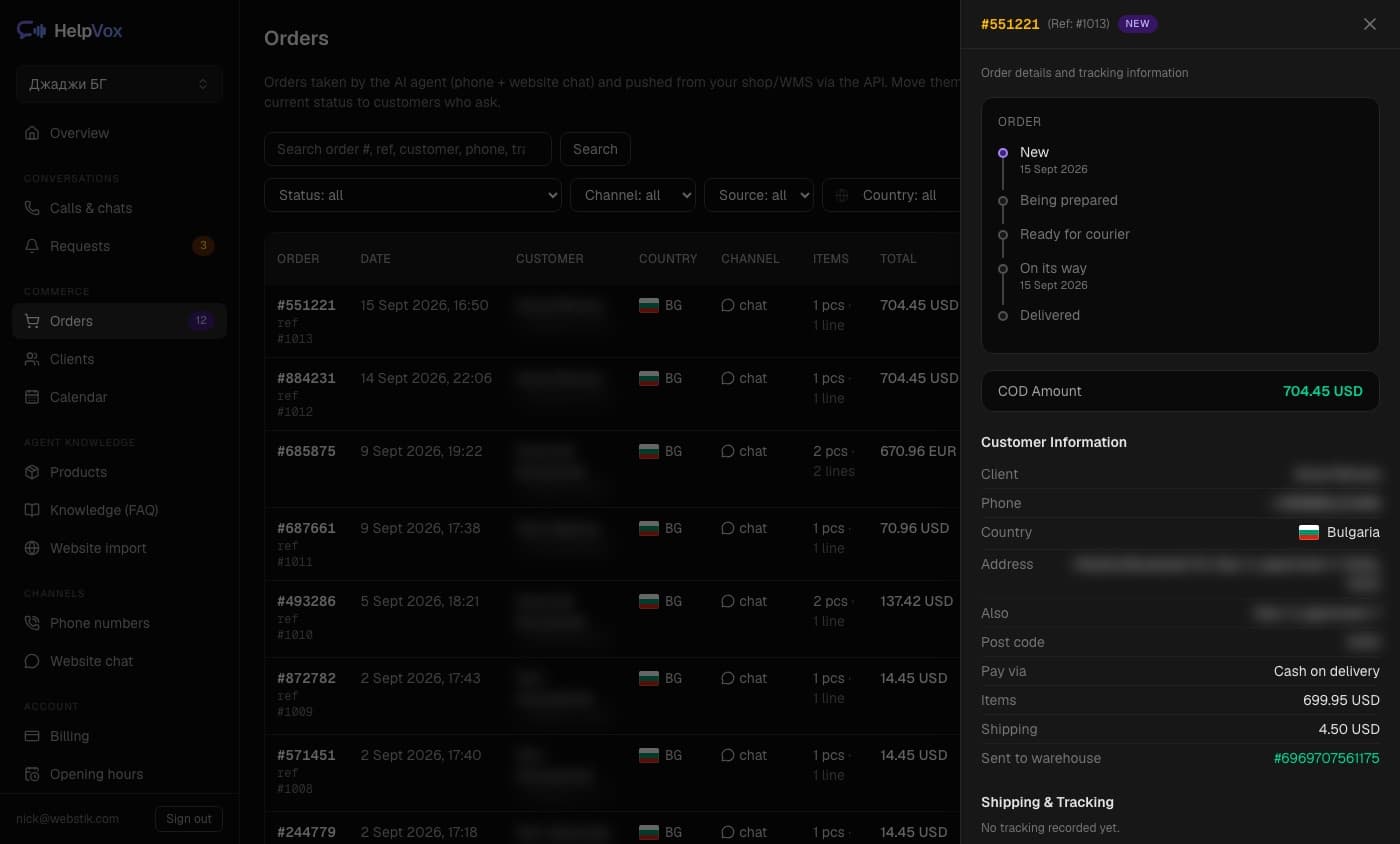
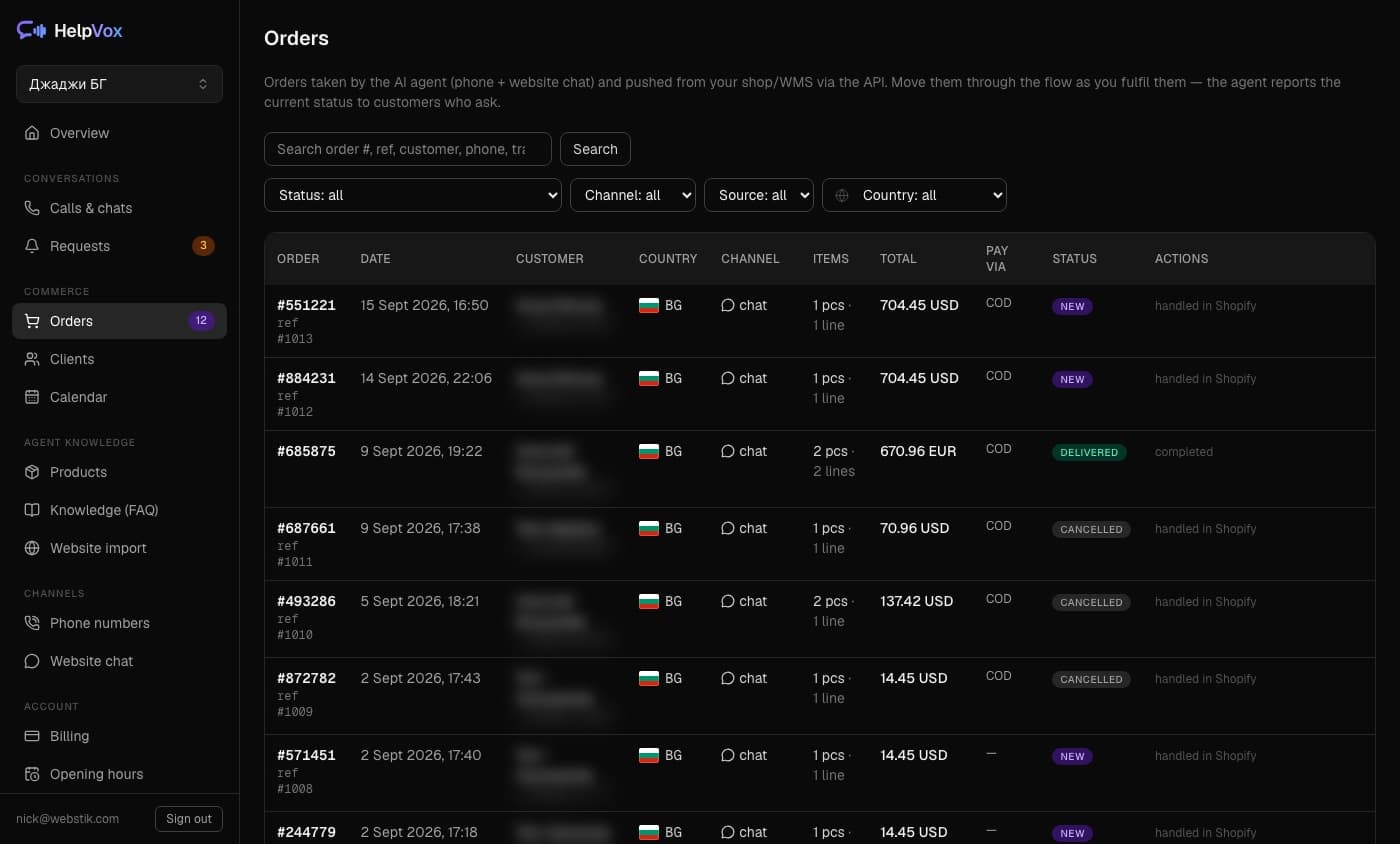
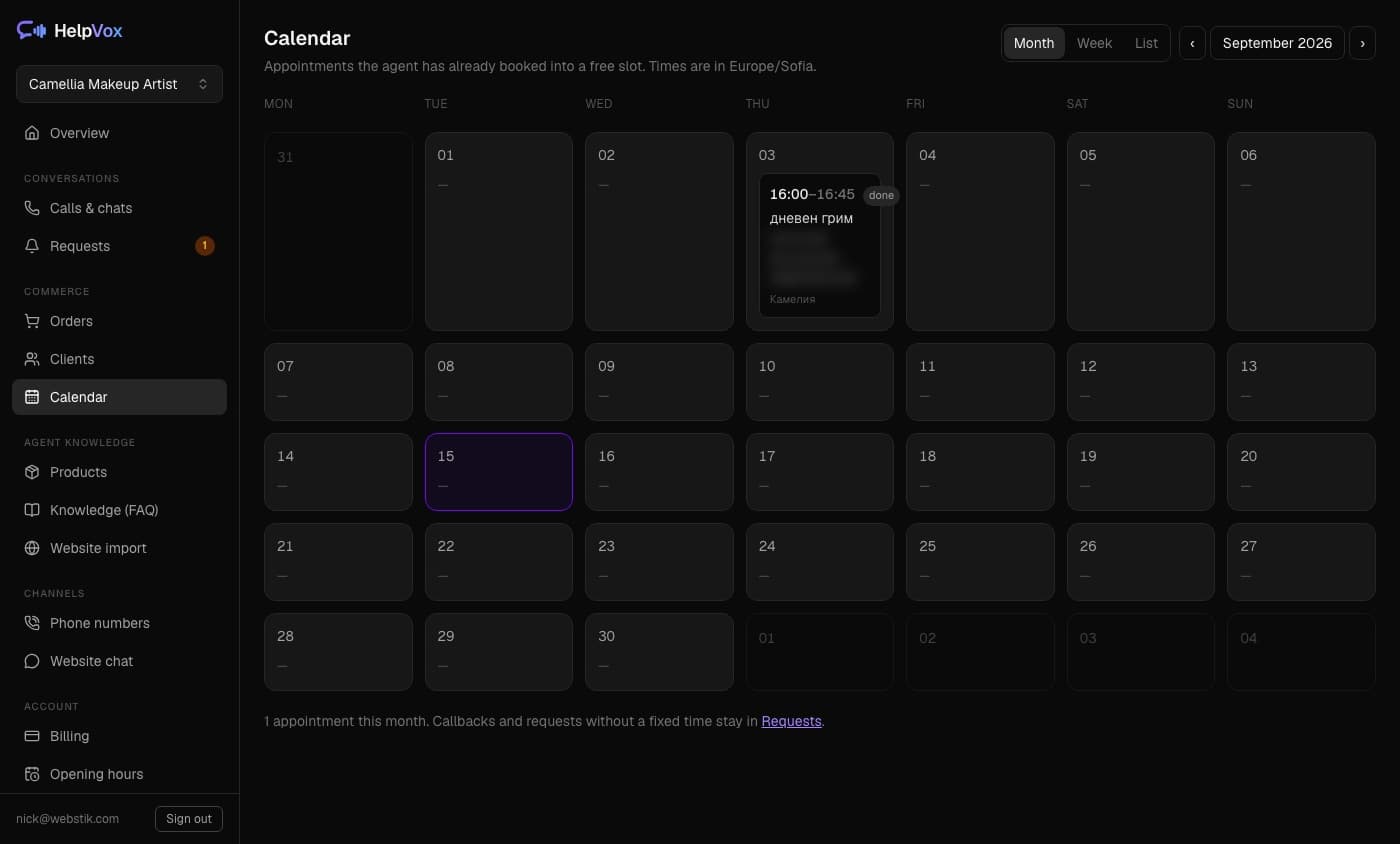
Screens from real HelpVox accounts with test customer data.
How to get started
- 1
Connect your products or services
Through Shopify, WooCommerce, BigArena, euShipments, website import or the REST API.
- 2
Set up phone and chat
Pick a number — ours or your own — plus language, voice and working rules.
- 3
HelpVox starts serving your customers
Every conversation, order and analysis appears in the dashboard.
Integrations
HelpVox doesn't work from stale copied information. It connects to your catalogue and systems to use current prices, stock, orders and parcel statuses.
WooCommerce
ReadyA WordPress plugin: catalogue, orders and shipment statuses. It connects itself — no keys to copy by hand.
See the pageOpenCart
ReadyA free extension: catalogue, options, orders and stock. It connects itself — no keys to copy by hand.
See the pageShopify
ReadyAn app for your store: catalogue, orders and fulfilment statuses.
See the pageBigArena
ReadyBuilt-in connection: products, orders and statuses per market.
euShipments
ReadyBuilt-in connection: orders go to the warehouse, shipment statuses and waybills come back.
Website import
ReadyProducts, FAQs and company information — straight from your site.
Apps
ReadyReady-made add-ons you switch on in a click — loyalty points today, more coming. Anyone can build one.
See the pageREST API
Via APICatalogue, orders, requests and knowledge — for any platform.
Warehouse and ERP systems
Via APINew orders to the warehouse, statuses and tracking numbers back.
Other systems
Set up individuallyIntegrations built to your specification, on the Enterprise plan.
Agentic commerce
Get your shop ready for shopping through AI agents
People are starting to shop by asking an AI assistant. For that assistant to find what you sell, your catalogue has to be readable by a machine — and the order has to land in your shop, not in a screenshot.
What actually happens
- 1
Your catalogue is published in a machine-readable form
HelpVox publishes a UCP manifest for your shop: what you sell, the prices, the stock and which support topics you handle.
- 2
An external agent searches and finds a product
It searches your catalogue and asks for a specific product, the way a customer would.
- 3
The agent hands the customer over
Where the agent supports the HelpVox assisted-order flow, it passes the conversation to your assistant instead of guessing.
- 4
The customer confirms the order themselves
The agent never confirms a purchase on the customer's behalf. The customer gives what is needed and says yes.
- 5
The order is created in your shop
In whatever you have connected — and from there it behaves like any other order.
What this is, and what it is not
- HelpVox does not implement UCP checkout and does not take payments.
- Assisted Order is a handover, not an automatic purchase: the customer finishes the conversation with your assistant.
- Which external agents can use it depends on whether they support the relevant UCP capabilities and the HelpVox extension.
And you can see what the agents did
- Which agents called, and how often
- What they searched for in your catalogue
- Which searches came back empty
- How far they got: search, product, handover, order
- Which calls you refused, and why
AI management
Run your assistants by simply asking
Connect HelpVox to Claude, Claude Code or Codex and do the daily work in plain words, instead of walking through screens.
How it works
- 1You ask Claude or Codex
- 2It calls the HelpVox MCP server
- 3HelpVox performs an operation you allowed
- 4The change appears in the dashboard like any other
Things you can just say
- Show me the orders that still need attention.
- Change the opening hours for the holidays.
- Update what the phone assistant says about delivery.
- Sync the catalogue with the shop.
- Find the conversations that need a follow-up.
You decide what it may touch
Connecting asks for permission by area. Reading is one permission; writing orders, products, the knowledge base, the company profile, settings and the team are each a separate one. What you do not grant, the assistant cannot do.
This is a management interface for you — not a shopping interface for your customers.
AI that knows when to bring in a person
HelpVox uses your business's information and rules. When there isn't enough data, the case is sensitive or the customer asks for help, the assistant transfers the conversation or creates a callback request.
How we handle data: Privacy policy · Terms of service
Controlled sources
Answers only from your catalogue, Q&A and company information.
Business rules
Opening hours, delivery terms, cancellations and returns — as you set them.
History and transcripts
Every conversation is recorded with a transcript, summary and outcome.
Handover to a person
Live to your team, or a callback request with a summary.
Test mode
End-to-end orders marked as tests — they never reach your shop or warehouse.
Clearly an AI
The assistant introduces itself as an AI in the greeting and answers honestly if asked.
Pricing
Pick a plan by call volume. Drag the slider to see which one fits.
Assumes an average call of 3 minutes. Your dashboard shows the real usage.
Start
For one shop or salon on one market
- Credits for roughly 905 minutes of phone calls, or to spend on chat
- 1 phone number
- Website chat, analyses and translations — from the same credits
- Orders: take, change, cancel, returns
- Appointment & booking requests
- Website import: profile, FAQ & products
- Voice picker + pronunciation dictionary
- Transcripts + AI analysis of every conversation
- API access (catalog, orders, WMS/ERP)
Growth
Most chosenFor a business on 2–3 markets with a small team
- Credits for roughly 3,405 minutes of phone calls, or to spend on chat
- Up to 3 phone numbers (countries & languages)
- Everything in the Start plan
- Live transfer to your team
- Up to 5 team members
Scale
For merchants on up to 10 markets with high volume
- Credits for roughly 10,450 minutes of phone calls, or to spend on chat
- Up to 10 phone numbers
- Everything in the Growth plan
- Cloned brand voice (on request)
- Priority support with SLA
- Personal help with the setup
Enterprise
For volumes and integrations beyond the standard plans
- Negotiated credit volume and pricing
- Integrations built around your systems
- Guaranteed capacity for more simultaneous calls
- Custom service-level and data processing terms
- Direct line to our technical team
Phone, chat and analysis draw from one shared credit bundle. Actual usage is visible in the dashboard.
Video
See HelpVox in action
Our YouTube channel has short clips: an overview, a real phone call that ends in an order, and how-to videos for the dashboard settings. The clips are in Bulgarian.
- 0:55
HelpVox in a minute
What the agent does on the phone and in the store chat.
Watch on YouTube - 1:26
A call that ends in an order
A customer calls, the agent suggests a product and takes the order.
Watch on YouTube - 0:51
Getting started
From sign-up to a working agent that knows your products.
Watch on YouTube
The how-to clips cover adding the chat to your site, connecting your store and teaching the agent new answers.
All clips on the channelFrequently asked questions
See how HelpVox would work for your business
We'll walk you through a real scenario with your products or services and work out the right plan for your volume.